
有没有朋友研究过 在window平台下 系统IO使用率的获取方式
如:任务管理器下就有IO使用率跟踪
如:任务管理器下就有IO使用率跟踪
解决方案
5
windows平台下有一堆标准的计数器,这是很标准的东西。
35
using System;
using System.Collections.Generic;
using System.Text;
using System.Management;
using System.Diagnostics;
using System.Runtime.InteropServices;
namespace ScanToolServiceShell
{
    public class SystemInfo
    {
        private PerformanceCounter m_cpu;       //CPU计数器
        private PerformanceCounter m_disk;      //CPU计数器
        private List<PerformanceCounter> m_sent = new List<PerformanceCounter>();
        private List<PerformanceCounter> m_recv = new List<PerformanceCounter>();
        private long _PhysicalMemory = 0;       //物理内存
        public long PhysicalMemory {
            get {
                return _PhysicalMemory;
            }
        }
        public int ProcessorCount {
            get {
                return Environment.ProcessorCount;
            }
        }
        public SystemInfo() {
            //cpu查询
            m_cpu = new PerformanceCounter("Processor", "% Idle Time", "_Total");
            m_cpu.MachineName = ".";
            m_cpu.NextValue();
            //磁盘查询
            m_disk = new PerformanceCounter("PhysicalDisk", "% Idle Time", "_Total");
            m_disk.MachineName = ".";
            m_disk.NextValue();
            //获得物理内存
            ManagementClass mc = new ManagementClass("Win32_ComputerSystem");
            ManagementObjectCollection moc = mc.GetInstances();
            foreach (ManagementObject mo in moc) {
                if (mo["TotalPhysicalMemory"] != null) {
                    this._PhysicalMemory += long.Parse(mo["TotalPhysicalMemory"].ToString());
                }
            }
            //获取网卡
            foreach (var v in new PerformanceCounterCategory("Network Interface").GetInstanceNames()) {
                m_sent.Add(new PerformanceCounter("Network Interface", "Bytes Sent/sec", v));
                m_recv.Add(new PerformanceCounter("Network Interface", "Bytes Received/sec", v));
            }
        }
        /// <summary>
        /// cpu 使用率
        /// </summary>
        /// <returns></returns>
        public float GetCpuUsage() {
            float f = 100 - m_cpu.NextValue();
            if (f < 0) return 0;
            if (f > 100) return 100;
            return f;
        }
        public float GetMemoryUsage() {
            return (1 - (float)this.GetMemoryAvailable() / this.PhysicalMemory) * 100;
        }
        public long GetMemoryAvailable() {
            long lSize = 0;
            ManagementClass mc = new ManagementClass("Win32_OperatingSystem");
            foreach (ManagementObject m in mc.GetInstances()) {
                if (m["FreePhysicalMemory"] != null) {
                    lSize = 1024 * long.Parse(m["FreePhysicalMemory"].ToString());
                }
            }
            return lSize;
        }
        /// <summary>
        /// 磁盘使用率
        /// </summary>
        /// <returns></returns>
        public float GetDiskTime() {
            float f = 100 - m_disk.NextValue();
            if (f < 0) return 0;
            if (f > 100) return 100;
            return f;
        }
        //上传速度
        public float GetSendBytes() {
            float f = 0;
            foreach (var v in m_sent) f += v.NextValue();
            return f;
        }
        //下载速度
        public float GetRecvBytes() {
            float f = 0;
            foreach (var v in m_recv) f += v.NextValue();
            return f;
        }
    }
}
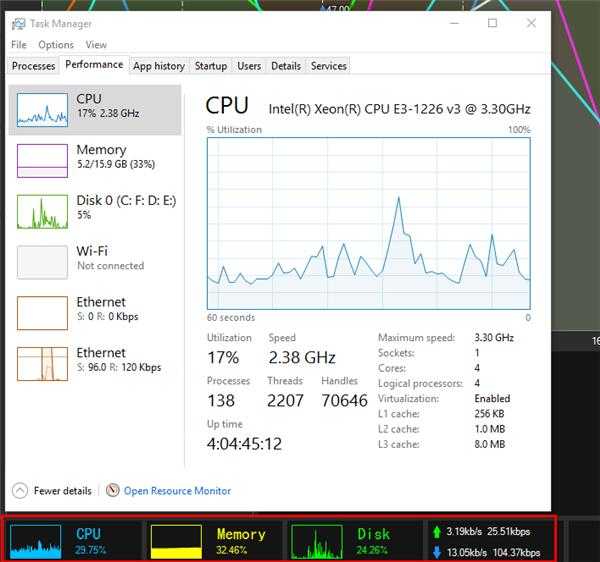
下面那一排 本人就是用的上面的代码统计的 也和系统没差多少